


Over the next few weeks, the YuJa Lumina Video Platform will be releasing various streamlined workflows for setting up RTMP live streams, customizing interface layouts, editing elements of your videos, such as captions and thumbnails, and much more. With these improvements, users will have more control over their media library and live streaming options.
-
Personalize Your Interface With Custom Layouts in Enhanced Enterprise VideoTube
Admins can now modify the appearance of their Enterprise VideoTube Platform to tailor to specific needs, themes, and preferences. Using the dynamic live preview, you can try out new page designs before applying the customization to your page.
The following customizations are available:
-
Layout Style: Choose the general layout of content sections on your VideoTube. Available styles include: default, split, and blocks. You can also choose from preset or custom colors for buttons and text.
-
Sidebar Navigation Items: Choose tabs to include or exclude from your side navigation bar. You can also create a custom new tab.
-
Hero Video Banner: Choose the visual style of the video banner and the number of videos to display in the carousel.
-
Content Collections: Choose the content collections to display on your VideoTube page. You can also add a new collection.
-
-
New RTMP Stream Workflow Simplifies Streaming Experience
The look and workflow of the RTMP live stream experience has been refreshed to introduce a more intuitive user experience. Key features include:
-
Default RTMP Stream Session: A default RTMP stream session is now automatically added in YuJa Lumina when an institution has no existing streams, allowing instructors to start a session directly without needing to create a new stream.
-
Automatically Created Sessions: A session is automatically generated when a new stream is created, allowing instructors to immediately start broadcasting.
-
24/7 Sessions: Recording is automatically disabled for 24/7 sessions to minimize the risk of overloading storage. The save and publish location is also hidden when recording is disabled.
-
-
Streamlined Experience for Managing Video Thumbnails
When a new thumbnail is uploaded to a video in YuJa Lumina, it is now automatically saved to the list of thumbnails and is chosen as the current thumbnail for the video by default. This enhanced workflow allows users to update the look of their videos in a simple and efficient process.
-
Designing Accessible Captions Now Faster With New Modal
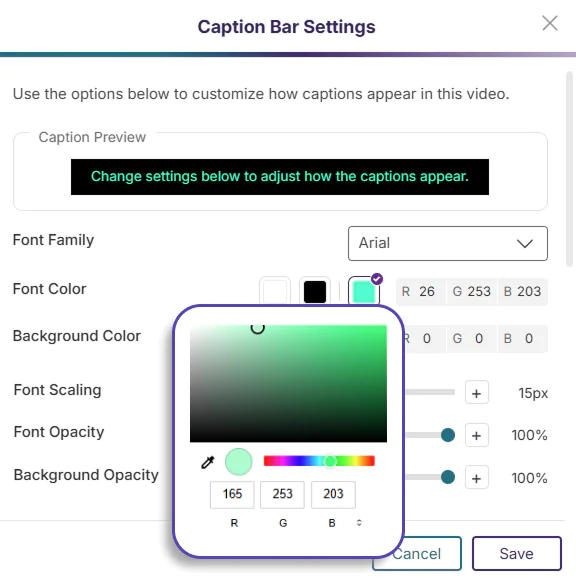
The Caption Bar Modal has been redesigned to introduce more font and color customization options for video captions. Users can use the built-in color picker, font settings sliders, and the caption preview to ensure that their captions are clearly visible and readable in their video.
-
Record Every Detail With 4K Browser Capture
YuJa Lumina Browser Capture now offers recording up to 4K with a supported camera stream. With four times the resolution of 1080p, 4K offers Ultra High Definition (UHD) image clarity to viewers and provides more flexibility during video editing without sacrificing the quality of video clips.
-
Keep Up With Live Streams Using Notifications
Class members are now notified via email and via a message in their Notifications Tab whenever a live stream has started, helping them keep track of scheduled streams and attending them on time.
-
Regulate Student Submissions With Specific Quiz Closing Times
Instructors can now choose to set specific times for quizzes to close in YuJa Lumina, further mimicking a real-life classroom schedule and encouraging students to complete their assessments within a designated time frame.
-
New Audit Logs for Live Streams Provide Additional Transparency
Audit logs have been added to a live stream session, documenting comprehensive details on stream sessions that provide essential information to instructors. The following logs are now available:
-
Stream session started successfully/unsuccessfully
-
Stream session waiting for video input
-
Stream session in progress
-
Stream session ended successfully
-
Stream session video uploaded
-




 YuJa.com
 Contact Us


