In the coming weeks, the YuJa Verity Test Proctoring Platform will roll out exciting new features, including Firefox support, multi-camera assessments, a streamlined setup interface, proctoring profiles for a faster setup experience, and so much more.
-
Use YuJa Verity on Firefox to Protect Academic Integrity
YuJa Verity is now available on Firefox through a dedicated browser extension. Instructors and students can now access secure, proctored assessments across all major browsers, leveraging additional flexibility while ensuring consistent performance, exam integrity, and a seamless testing experience on the browser of their choice.
-
Accelerated Proctoring Setup through Guided Profiles
YuJa Verity is introducing preset Proctoring Profiles to make secure assessment setup faster and easier for instructors. Rather than configuring every setting manually, instructors can now choose from predefined profiles that align with their assessment needs. Instructors can also create custom configurations to have full control over how assessments are monitored. Instructors can choose from the following profiles:
-
Standard: Provides video, audio, screen, room scan, ID verification, and proctoring restrictions for browser tabs.
-
Advanced: Applies the highest level of security using the Lockdown App. All proctoring and access restrictions are enforced.
-
Essential: Provides a minimal proctoring configuration that prioritizes ID verification and recording.
-
Custom: Allows instructors to select how assessments are monitored and which access restrictions are applied.
-
-
Streamlined Proctoring Setup Experience
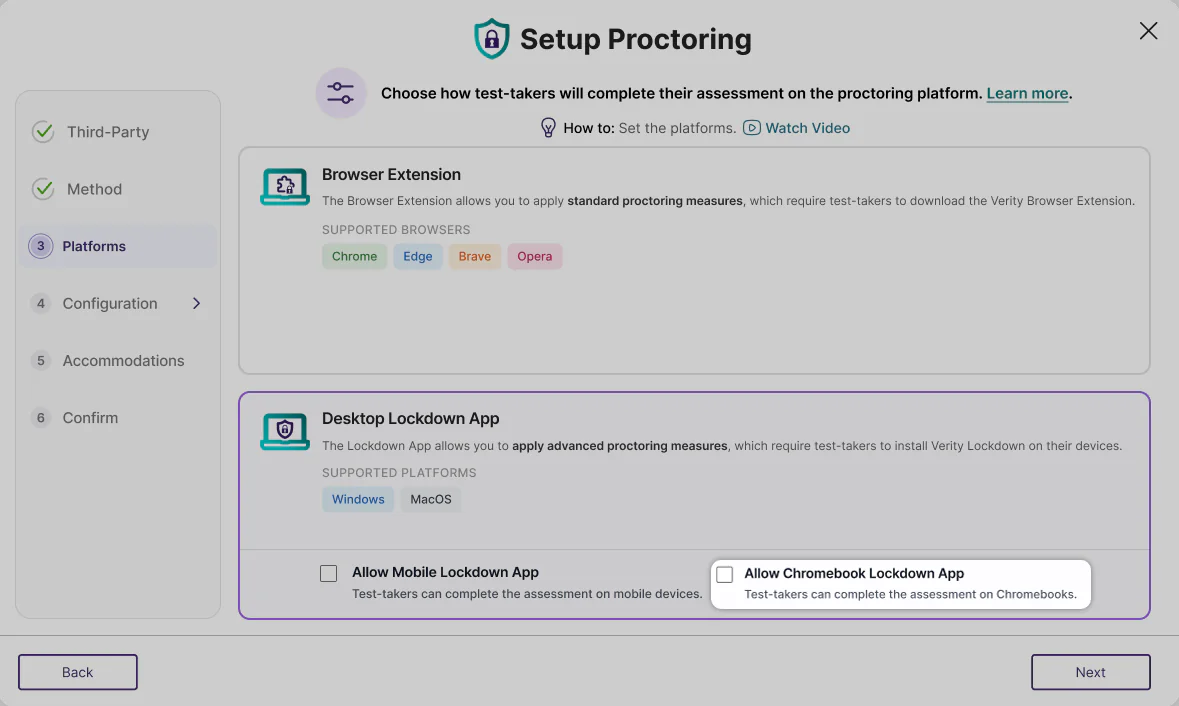
The YuJa Verity Proctoring Setup experience now features a cleaner, more intuitive user interface, additional contextual tooltips, and consolidated menus, allowing instructors to configure and reuse proctoring settings across multiple sessions with ease. This consolidation helps instructors set up their preferred proctoring settings without navigating multiple screens, effectively reducing the margin of error while setting up and dedicating more time to coordinating lesson plans and course materials. This streamlined workflow also simplifies the management of multiple courses as instructors no longer have to repeat the set up process for every assessment, saving time while preserving preference settings in a custom profile across multiple assessments.
In the new Proctoring Setup, users will find:
-
A Consolidated Interface: Configuration settings have been regrouped to be more intuitive, making the Proctoring Set Up workflow smoother and faster.
-
The Chromebook Lockdown App: Test administrators can now select if they want to allow test-takers to complete their assessment on Chromebooks, increasing the accessibility of proctoring assessments across platforms.
-
Custom Profiles For Reuse: Once an institution has created custom proctoring profiles, test admins will be able to easily select them from the Profile tab. When selecting a custom profile, instructors do not have to reconfigure individual settings, making the set-up process significantly faster.
-
Detailed Tooltips: When selecting proctoring profiles, users can hover over the tooltip icon to receive detailed information about configuration details to make sure they select the best profile for their needs.
-
-
Enhance Your View of Testing Environments by Using a Multi-Camera Setup
Previously, instructors and students could use one camera source to record proctored assessments. We’ve now added a feature that allows instructors to require test-takers to record their test-taking environment from two separate cameras to capture a wider view of the testing environment during assessments. Test-takers can now choose multiple cameras during the Proctoring Setup step, and users with the Mobile Lockdown App can seamlessly use their phone as a second camera. This addition provides a more secure proctoring experience for both students and instructors, and offers more options over how exams are monitored.
-
Get Faster Help with Integrated Live Chat and Support
The support experience has been fully redesigned to reduce the amount of time and steps required for instructors to request help from our experts. Live Chat functionality is now integrated into the Support modal, opening instantly with one click to provide real-time assistance without navigating away from the YuJa Verity platform. By centralizing all support options in one modal, instructors and admins can quickly find the help they need and resolve issues more efficiently.
-
Comprehensive Video Tutorials for First-Time Users With LMS-Specific Instructions
Instructors and students can now view introductory tutorial videos the first time they launch YuJa Verity, giving them a guided introduction to the platform and how it integrates with their LMS. These videos remain accessible after the first session and can be accessed at any time via a How to link. With full LMS support across all major learning management systems, including Canvas, D2L Brightspace, Moodle, and Blackboard, YuJa Verity provides an extensive onboarding and support experience that helps users get up to speed quickly in multiple languages.