Over the next few weeks, YuJa Panorama LMS Accessibility Platform will be adding new features that allow users to make compliant video content, gain clear visibility into credit usage, easily apply settings across courses, and more.
-
Make LMS Videos Accessible Using the New Video Compliance Player
Panorama’s new Video Compliance Player allows users to embed videos into their LMSs with an extensive toolset of accessibility features such as captioning, enhanced audio descriptions, and video chaptering. This appears in a dedicated Video Compliance tab in the sidebar, seamlessly integrating into Panorama workflows. Users can embed third-party content effortlessly without sacrificing captions or compliance features, providing an accessible and inclusive viewing experience for all learners. The Video Compliance Player comes with 5 hours of free credits every month, with additional credits available for purchase.
Key features include:
-
Automatic Captioning: Effortlessly add captions to video content, ensuring that videos are easily understood by users, regardless of auditory ability.
-
Enhanced Audio Description: Make your institution compliant with Title II accessibility standards by using the Video Compliance Player’s detailed pause-and-play audio descriptions that foster an inclusive viewing experience.
-
Video Chaptering: Automatically break up long videos into smaller sections to make dense, information-packed videos easier to navigate, review, and understand.
-
-
Apply Settings Across Multiple Courses or Sub Accounts With One Click
Admins, sub‑admins, and instructors can now apply the same Course Settings to multiple courses or sub-accounts at once. This eliminates the need to update courses or sub accounts individually, allowing users to save time and avoid duplications, inaccuracies, and inconsistencies.
-
Effortlessly Manage Panorama Add-On Credit Usage
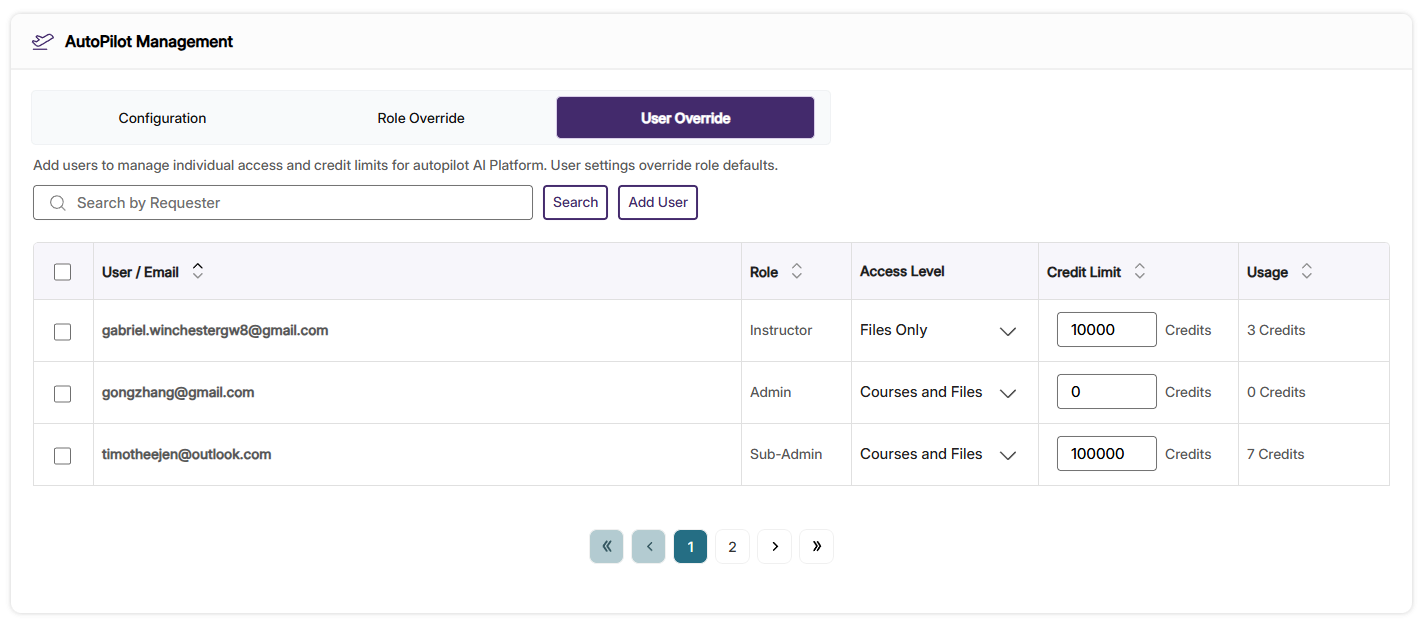
Panorama now provides admins with a data table clearly detailing add-on credit usage for AutoPilot and Structural Remediation. With this feature update, users will be able to manage add-on credit usage across the institution, assign credit limits for roles, and assign individual credit limits for users. With filtering, sorting, and export options, this consolidated data table simplifies credit management and helps ensure Panorama add-on products are being used in accordance with your institution’s specific needs.
In AutoPilot and Structural Remediation Management, users will be able to:
-
Monitor credit usage across roles and users: Admins can see how many credits are assigned to and spent by users, along with the total credits for each role.
-
Assign role credit limits: Admins can change or set credit usage limits for roles. Each user with that role permission receives the set credit limit.
-
Assign user credit limits: Alternatively, admins can change or set credit usage limits for individual users. User credit limits override role credit limits.
-
-
Use the New User Simulation Feature to Monitor DocHub Libraries
Admins can now view and manage the DocHub libraries of other users through the new User Simulation option. This grants admins the ability to monitor the accessibility and compliance levels of other users’ libraries, and permits them to work within other users' environments. This new organizational governance improvement ensures that the integrity of a user’s library is preserved during the simulation process and unauthorized access into private folders is prevented.
-
Marking Images as Decorative now Supported in Word, PowerPoint, and PDF Documents
Panorama’s inline remediation now lets users mark images as decorative with one click to resolve alt text issues when appropriate. The update is applied directly to the underlying file, so screen readers correctly ignore non-informative images, effectively reducing audible clutter while ensuring that documents are remediated according to compliance standards.
Users can mark images as decorative in:
-
PDF documents
-
Microsoft Word documents
-
Microsoft PowerPoint documents
-
-
Easily Update User Emails Without Data Duplication or Loss
Panorama now allows admins to easily update a user’s email address without manually recreating the user. Admins can quickly make changes to a user’s email field in addition to their first and last name directly within the Roster Management interface, or programmatically through the updateUserInfo API. This preserves all existing data, including roles, reports, and accessibility settings associated with the account, offering an intuitive and simple way to manage user information while eliminating the risk of data duplication or loss.
-
Get Insight on Your Institution's Accessibility Performance Using Comparison Reports
Admins can now see how their institution measures up against peers with the new Comparison Report feature. The report benchmarks your average accessibility score for the past year against fully anonymized data from other institutions, providing valuable insights on institutional compliance without compromising privacy. Users can also view the average accessibility score of different file formats, the number of issues auto-resolved by AlwaysOn Compliance, and Accessibility Insights. This makes it easier for admins to identify strengths, spot improvement opportunities, and make data-driven decisions to enhance their institution’s performance.
-
Manage Permissions Securely with the “ Content Developer” Role
Institutions can now map the Content Developer role to the Panorama Instructor role. This lets designers improve course accessibility just like instructors, without granting access to admin reports or institution-level settings, and eliminates the need to enroll them as teachers in hundreds of courses. The result is a streamlined workflow, secure role management, and faster accessibility improvements across courses.
-
Improved Workflows for Human-Assisted Accessibility Issues
Panorama now alerts users on edge case accessibility issues that could not be automatically remediated by the Remediation Engine. When an issue like difficult color-contrast requires manual remediation, it will be flagged by the Accessibility Report and identified to users through a pop-up modal. Users will also be provided with contextual guidance, tooltips, and remediation assistance to resolve them. With this new flagging system, users will be able to quickly identify difficult accessibility issues and take prompt action to fix them, in addition to reducing persistent flagging.
-
Faster Response Time for Large PDFs
We’ve optimized the Accessibility Report, Alternative Formats, and Report Viewer functionalities in Panorama to handle large PDF files more efficiently. These performance improvements enhance responsiveness when viewing reports or generating alternative formats for dense course material such as textbooks. With improved responsiveness, large PDFs become easier to review and remediate at scale using Panorama’s accessibility tools.